
Note: You can complete this tutorial and follow the demos completely free of charge by creating your AWS account and using free tier resources. For example, the first million Lambda invocations per month are free (yes, per month).
What is serverless?
Serverless, which literally means without a server, is a type of software architecture where the servers (physical or in the cloud) are not managed by the developer, and applications/code run in execution environments managed by cloud providers such as AWS, GCP, Azure, or IBM, among others. You can also build your own serverless architecture using Docker/Kubernetes, with examples such as OpenFaas or Knative. You could say that serverless is the highest layer of abstraction in the cloud, where users focus on writing and uploading functions in languages such as Python, Node.js, Go... without worrying about how that code will be launched on, for example, an EC2 instance or a Docker container. That last part is managed by the provider.
As you might guess, serverless doesn't mean there are no servers (the code/application has to run on a server). Rather, it means that their management, scalability, maintenance, execution, and availability are mostly handled by the service provider and only available for as long as they are needed. That lets you focus on developing your application or defining the best model for your database without worrying about whether the server is available 24/7 or running the latest version of the operating system.
While Amazon Web Services (AWS) Lambda is probably the best-known serverless service, there are two important details to keep in mind:
- Many cloud providers have their own serverless services. For example, in serverless computing we find: Amazon with AWS Lambda, Microsoft with Azure Functions, Google with GCP Cloud Functions, and IBM with IBM Cloud Functions. We also see new and established providers betting heavily on these technologies: Netlify with Netlify Functions, Serverless with Serverless cloud, Vercel with Vercel Functions, or Cloudflare with Cloudflare Workers. In this blog post by Fauna, you'll find an interesting comparison.
- There are many types of serverless services, not just compute. For example, S3 (the well-known AWS object storage service) is considered a serverless service, and so is dynamoDB (AWS's non-relational database). You can find the list of AWS serverless services here.
Example of a 100% serverless CRUD application on AWS
Let's look at a backend example that uses a combination of serverless services to create, edit, read, and delete products in a database (a CRUD application).
AWS serverless services you'll need
- API Gateway: To quote the official documentation, Amazon API Gateway is a fully managed service that makes it easy for developers to create, publish, maintain, monitor, and secure APIs at any scale.
- Lambda: To quote the official documentation, AWS Lambda is a serverless, event-driven compute service that lets you run code for virtually any type of application or backend service without provisioning or managing servers.
- DynamoDB: To quote the official documentation, Amazon DynamoDB is a fully managed, serverless, key-value NoSQL database designed to run high-performance applications at any scale.
Combining the different serverless services
The following figure shows how we combine the services described above.
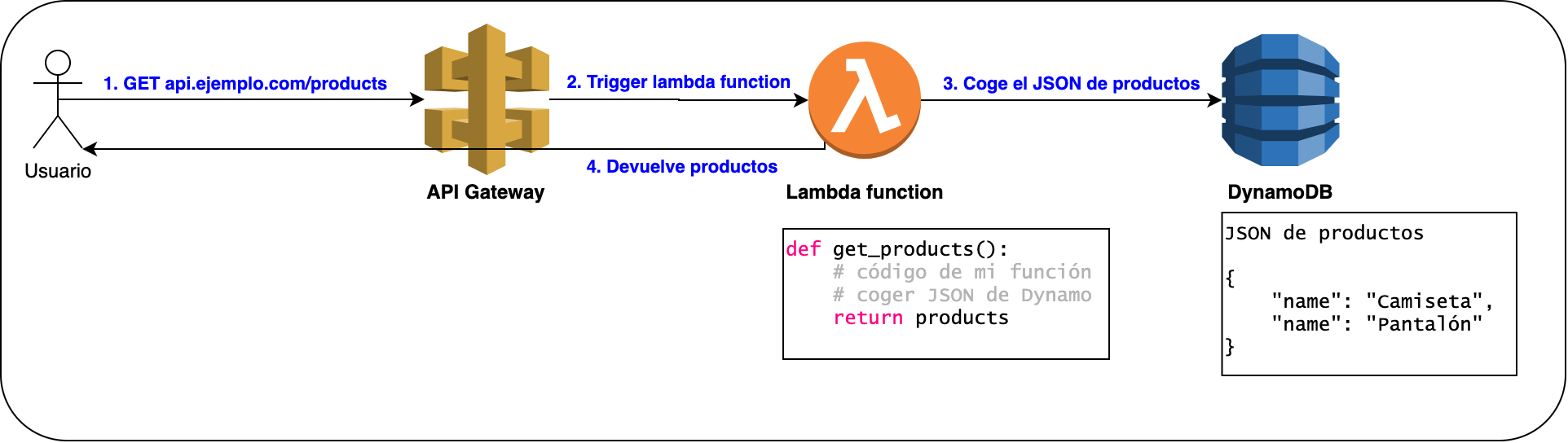
Figure 1. Simple serverless example using API Gateway + Lambda + DynamoDB. All three are serverless services, although Lambda and the other services can also communicate with any internal or external service, serverless or not (e.g., Lambda with RDS, or API Gateway with an EC2 instance)
Here's how it works:
- (Step 1) The user makes an HTTP call using the GET method to [api.example.com/products](<http://api.example.com/products>) , where api.example.com is the DNS record that points to our API Gateway, and /products is the route in our API Gateway. The /products route is associated with an action — in this case, invoking a Lambda function (Step 2)
- (Step 2) When the Lambda function is invoked, whether by an HTTP call or another triggering event, our Lambda function's execution environment starts and the code runs. In the example, the get_products() function will call the DynamoDB database via an HTTP call to retrieve the products (Step 3). Once the products are received, the Lambda function will return the response to the user (Step 4), and immediately after returning the response, the Lambda function will shut down (the execution environment will be removed*). As a result, we only pay for our function's execution time. Here we can see a big difference compared to a “normal” server: in this case, the Lambda only runs when it's invoked, not 24/7. * Strictly speaking, the Lambda will stay “cached” for a few minutes, which lets it run faster on the next invocation.
Scalability and other advantages of Lambda functions
If the function is invoked a thousand times, the provider takes care of scaling and spinning up the number of environments needed to respond to all thousand invocations. For example, let's say we have three users requesting the products (sending a GET to the same route) at the same time → three Lambda functions with the same code will be launched automatically and concurrently (see figure below).
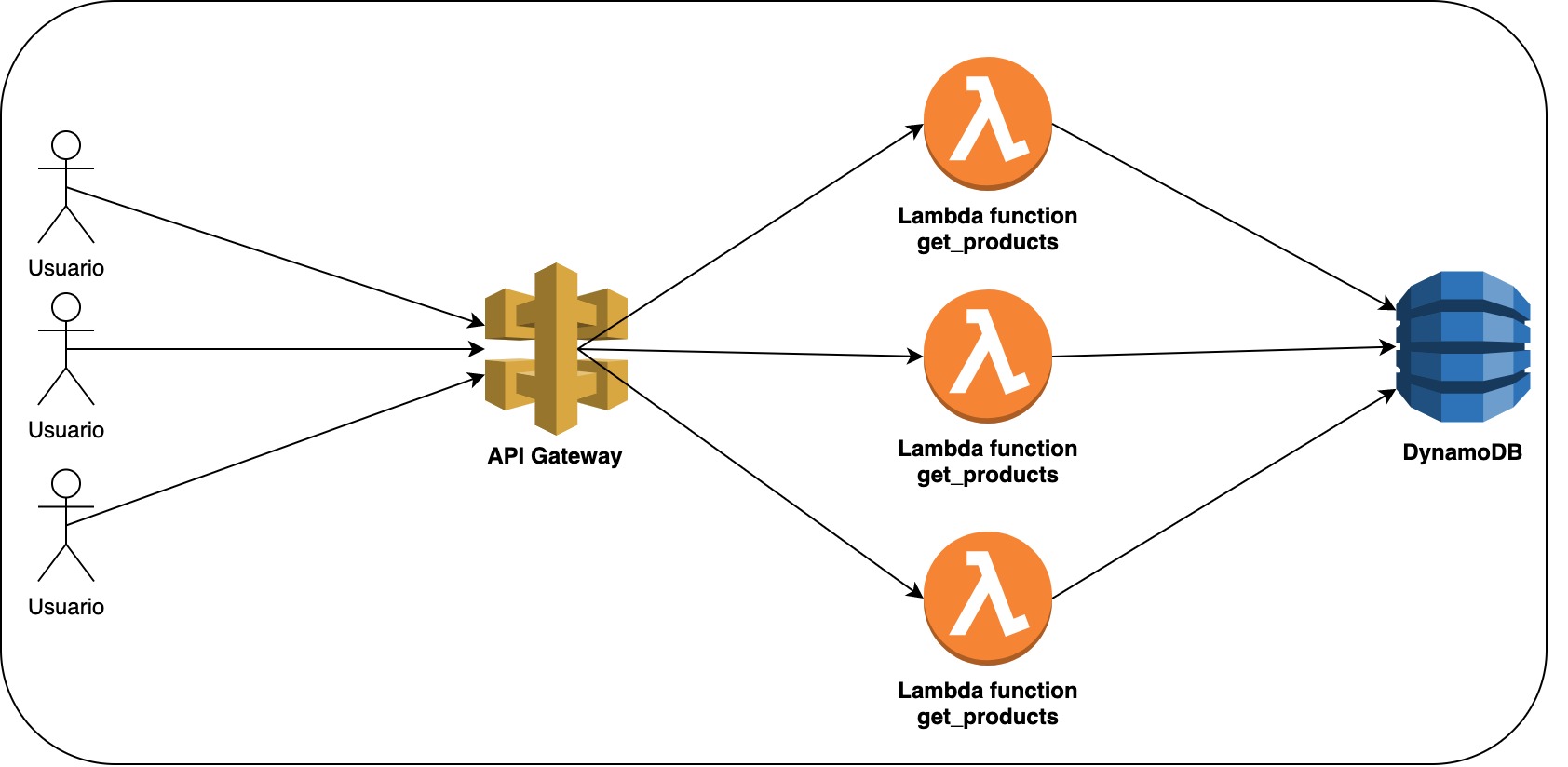
Figure 2. Example with three users calling the same route. API Gateway will launch a new Lambda for each call. This way, we can run thousands of calls per second concurrently.
Other advantages of using Lambda instead of a conventional server include:
- The provider charges for code execution time. That's why small, single-purpose, fast-running functions are the way to go (ideal for microservices).
- No requests, no cost.
- No servers to manage.
Using a framework to build a serverless backend
Although we can build the previous example using the AWS console completely free of charge (see the note at the beginning of this blog post for details), it's better practice to use configuration files that let us replicate and maintain this infrastructure easily. Infrastructure as Code (IaC) tools simplify this job. Some IaC options specific to serverless applications are Serverless Framework, AWS SAM, and AWS CDK.
Serverless Framework
Serverless Framework belongs to the company "Serverless, Inc" (a very well-chosen name) and is a tool that lets you develop, test, deploy, and monitor scalable, pay-per-execution serverless applications on any cloud (AWS, Azure, Google Cloud, ...) easily, using YAML (.yml) configuration files. Serverless (the company) is an AWS Technology Partner and has a very good integration with this cloud platform.
Why use a framework?
Let's look at the differences between using a framework and not using one. In this case, we'll use Serverless Framework, although the advantages are more or less the same with another framework such as SAM.
Without Serverless Framework:
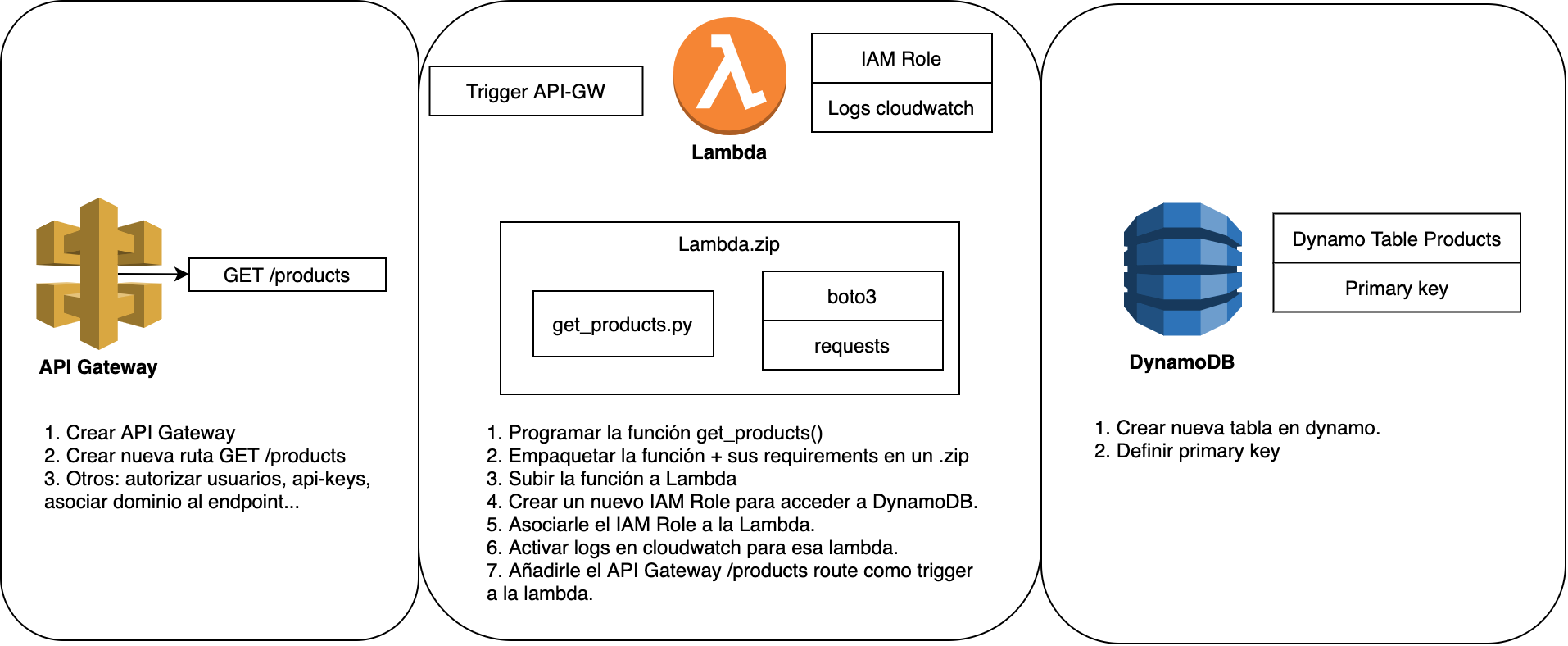
Figure 3. Example of the steps a developer has to take to launch the serverless application in Figure 1 without using Serverless Framework.
With Serverless Framework:
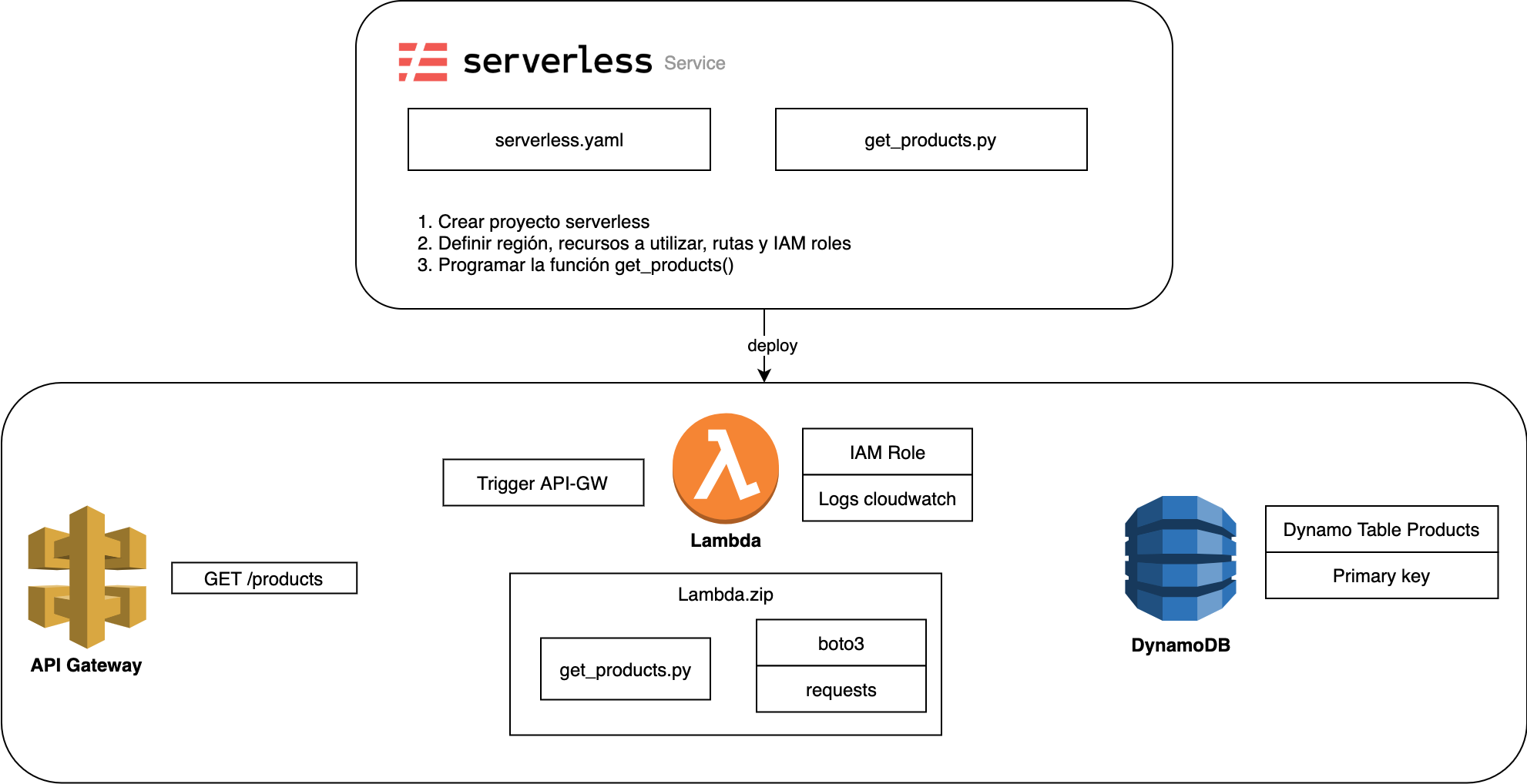
Figure 4. Example of the steps a developer has to take to launch the serverless application in Figure 1 using Serverless Framework.
In Figure 3, we can see the steps we have to take manually in the AWS console to create the example service. In Figure 4, we can see the steps to take when using Serverless Framework. The big difference is that in the first case, we're doing manual work that can't be replicated when we need to create a second Lambda function, so it's neither scalable nor maintainable over time. While I recommend going through this process to try out all the options, it's only suitable for testing and MVPs. In the second case, we finish the process with a .yml file that contains all the configuration needed to replicate, extend, and understand the serverless infrastructure.
Other advantages specific to Serverless Framework include:
- ☁️Abstraction layer to easily develop, test, deploy, and monitor serverless services such as Lambda, API Gateway, DynamoDB, and S3. Other equivalent services: AWS SAM (Serverless Application Model).
- 💸Auto-scaling serverless apps with monitoring, CI/CD pipelines, and low cost.
- 👫Compatible with multiple providers/clouds: Serverless deploys to AWS, Microsoft Azure, Google Cloud Platform, Apache OpenWhisk, Cloudflare Workers, Tencent, Alibaba, or Kubernetes-based solutions such as Kubeless. More info here.
- 🚀Easy to use, with a gentle learning curve. Developers with no server experience can ship scalable, production-ready applications in a short time.
- 👀Infrastructure as Code: a single YAML configuration file: serverless.yml
- 📈Real-time application monitoring in its own dashboard (direct connection to CloudWatch).
- 🐞Integration tests for functions with HTTP endpoints. Tests are defined in a YAML file, serverless.test.yml, and run with serverless test https://www.serverless.com/blog/serverless-test-framework
- ⚡️Thousands of free plugins ready to use. The must-haves for Python:
- serverless-python-requirements: "A Serverless plugin to automatically bundle dependencies from requirements.txt and make them available in your PYTHONPATH."
- serverless-domain-manager: "Create custom domain names that your lambda can deploy to with serverless. Allows for base path mapping when deploying and deletion of domain names."
- serverless-offline: "This Serverless plugin emulates AWS λ and API Gateway on your local machine to speed up your development cycles. To do so, it starts an HTTP server that handles the request's lifecycle like APIG does and invokes your handlers."
- ✅Free (up to one user) and compatible with the AWS free tier. More info here
How do you install Serverless Framework?
Installing Serverless Framework is as simple as opening the terminal and typing the command:
npm install -g serverless
There are, however, a few prerequisites (AWS CLI v2 + Node.js + npm):
- Create an account at serverless.com (free)
- Create an AWS account (free) at https://aws.amazon.com/es/
- Create an IAM user in AWS and get your credentials:
- Access key ID
- Secret access key
- How to create an IAM user: https://docs.aws.amazon.com/IAM/latest/UserGuide/getting-started_create-admin-group.htm
- Install AWS CLI v2 and configure it to use the IAM user created in the previous step. # aws CLI macOS installation
- curl "<https://awscli.amazonaws.com/AWSCLIV2.pkg>" -o "AWSCLIV2.pkg"
- sudo installer -pkg AWSCLIV2.pkg -target /# verify installation
- which aws
- # /usr/local/bin/aws
- aws --version
- # aws-cli/2.0.5 Python/3.7.4 Darwin/19.4.0 botocore/2.0.0dev9
- # configure aws CLI with IAM user
- aws configure
- To install on other operating systems: https://docs.aws.amazon.com/cli/latest/userguide/install-cliv2.html Quickstart guide: https://docs.aws.amazon.com/cli/latest/userguide/cli-configure-quickstart.html
- Install Node.js and npm. Download them at https://nodejs.org/en/
Creating a project with Serverless Framework
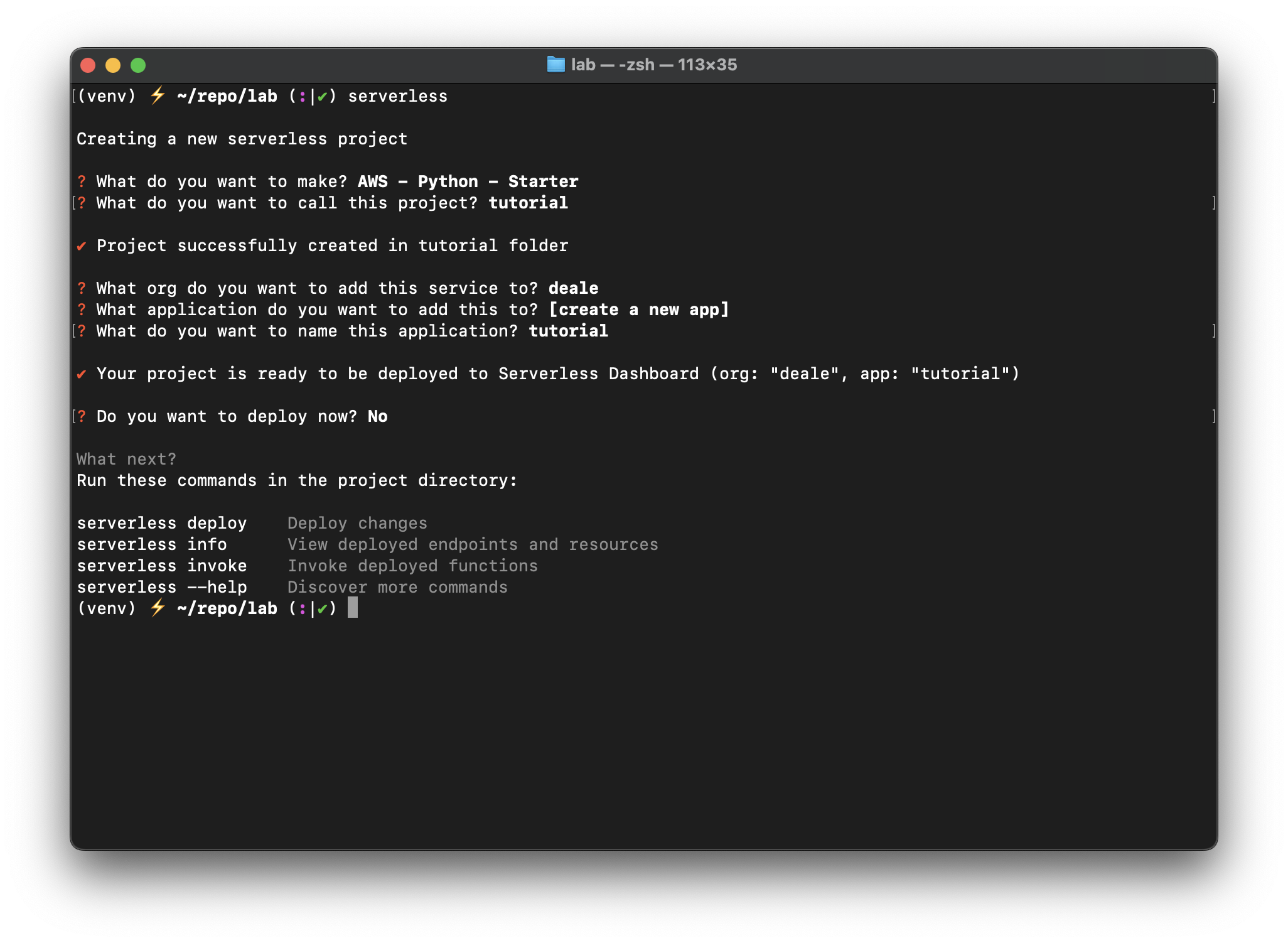
- Once it's installed, create your first serverless project by running: serverless
- Follow the prompt steps (see the image below), and your project is created.
-
- Check the files created in the folder's file structure. The most important ones are handler.py (where the Lambda code lives) and serverless.yml (the configuration file). As you'll see, you already have sample code ready to use. You don't need to change anything for now.
More details at https://www.serverless.com/framework/docs/getting-started/
Demo: Create a Lambda function with Serverless Framework
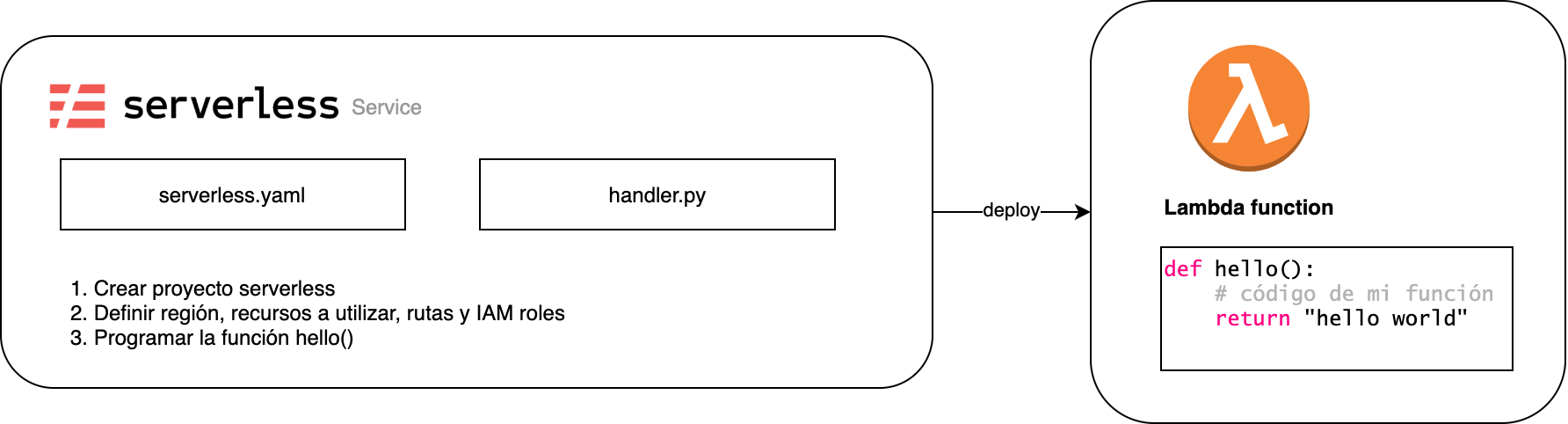
Figure 5. For now, our serverless service will only deploy one Lambda function.
- Create a new project (if you haven't already) by following the previous steps: serverless
- Edit the default serverless.yml: uncomment stage and region, and change region to eu-west-1 (Ireland) or your preferred region. The serverless.yml should look like this: # serverless.ymlservice: serverless-demo
- # app and org for use with dashboard.serverless.com
- app: serverless-demo
- org: myorg # change this with your org
- provider:
- name: aws
- runtime: python3.8
- # add stage and ireland region
- stage: dev
- region: eu-west-1
- functions:
- hello:
- handler: handler.hello
- The code above has three distinct parts:
- First, the service, app, and organization are defined: these names are filled in automatically when we create our project and make up the Serverless configuration.
- Second, provider. Here we define the provider, the programming language, the stage name (by default: dev, qa, prod), and the AWS region we're using.
- Third, functions. Here we define the Lambda functions we're going to use. The name of the hello function can be anything we want. The handler tells us where the handler function is.
- There are other important, though not essential, parts of a serverless.yml file. At this link you'll find the Serverless.yml Reference, with all the possible properties for this file.
- Deploy the Lambda to Serverless and AWS. serverless deploy
- Once the deployment is complete, you can:
- See the deployment result in the dashboard at app.serverless.com
- See what Serverless launches for us in the AWS CloudFormation stack (you don't need to know the details, just that Serverless uses CloudFormation "under the hood".
- See the Lambda function created in AWS and test it directly in the AWS console.
Demo 2: Serverless API with Lambda + API Gateway
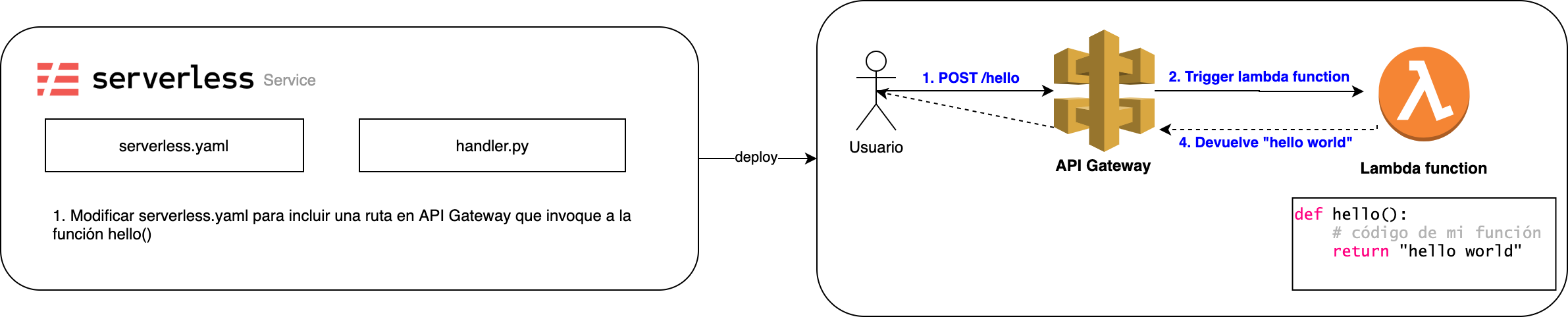
Figure 6. We add API Gateway to the service in Figure 5 to invoke the Lambda function.
From the previous section, we have our Lambda function working, but it's missing a trigger, something to "invoke" it. The invocation will come from a call to API Gateway. Let's add an API Gateway endpoint to the Lambda function:
# serverless.yml
service: serverless-demo
# app and org for use with dashboard.serverless.com
app: serverless-demo
org: myorg # change this with your org
functions:
hello:
handler: handler.hello
# add http endpoint using API Gateway
events:
- http:
path: /
method: get
Let's deploy it again:
serverless deploy
Once the deployment is complete:
- Find the API endpoint at app.serverless.com and copy it. It will be in the "API Endpoints" tab inside the deployed application.
- Call the API endpoint with Postman/curl, or simply open the URL in your browser. You should see your Lambda's result (response) (from handler.py): {
- "message": "Go Serverless v3.0! Your function executed successfully!",
- "input": {...},
- }
Conclusions
In this blog post, we've learned what serverless is, the different types of serverless services, and the cloud providers that offer them. We then looked at a real-world application of these services in two demos using Serverless Framework. In future blog posts, we'll cover more advanced topics such as communication between serverless services, how to build serverless microservices, and the most useful design patterns for designing our cloud architecture. Stay tuned!